





















Accurate, fast and secure email verification service
Verify email lists instantly — reduce bounces, clean data, and protect your sender reputation.
Ask AI about Email Awesome





© 2026 Email Awesome. All rights reserved.


Since November 2025, Gmail has scaled permanent rejections — error 550 — for senders that don't meet the bulk sender guidelines. Most guides cite 0.3% as the spam rate limit. That is the hard ceiling for immediate blocking. The safe operating threshold Gmail actually enforces is 0.08%: fewer than 1 complaint per 1,250 emails sent.
The Google bulk sender guidelines are not a 2024 rollout still in progress. They are fully enforced infrastructure in 2026, with Yahoo aligned since early 2024 and Microsoft joining in May 2025. This article covers exactly what the gmail sender requirements are in 2026, who they apply to, the complete email authentication checklist for google bulk sender guidelines, and the specific error codes Gmail returns when something fails.
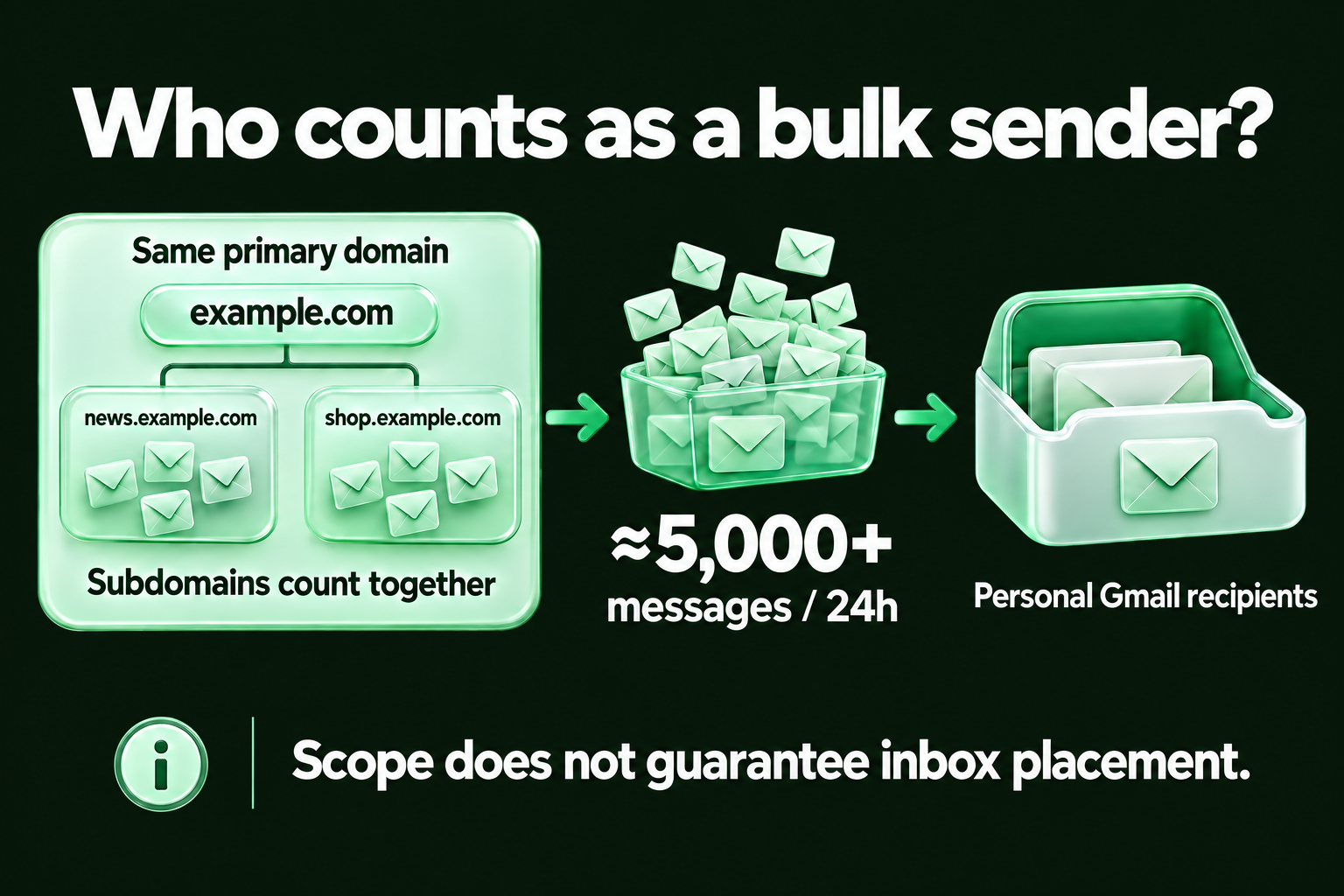
Google classifies a sender as bulk when the same primary domain sends close to 5,000 messages or more to personal Gmail accounts in 24 hours. Volume from its subdomains counts toward that total. This classification describes which requirements apply; it does not guarantee delivery or inbox placement. Source: Google sender guidelines FAQ.
Google defines a bulk sender as any account that sends approximately 5,000 or more messages to personal Gmail accounts within a 24-hour period. These gmail send limits apply to the organizational domain total, not per inbox. The threshold applies to the total volume across the organizational domain, including all subdomains.
The one-time rule matters. Crossing the 5,000-per-day threshold even once permanently classifies the domain as a bulk sender. Volume reductions afterward do not reverse the classification. Once flagged, the full set of bulk sender requirements applies indefinitely.
Google's bulk sender rules apply only to emails sent to @gmail.com and @googlemail.com addresses. They do not apply to recipients on Google Workspace accounts, corporate domains using Google's email infrastructure.
For B2B cold email, where the majority of contacts are on corporate domains running Google Workspace, this distinction changes the compliance calculus. Reaching the 5,000-per-day threshold to @gmail.com addresses is considerably harder than the raw sending volume might suggest. The email authentication requirements — SPF, DKIM, and DMARC — apply to all senders regardless of volume or recipient type.
| Requirement | All Senders | Bulk Senders Only (5,000+/day) | Gmail Error Code if Missing |
|---|---|---|---|
| Requirements for All Senders | |||
| SPF record | Required | Required | 4.7.27 / 5.7.27 |
| DKIM signature | At least one of SPF or DKIM | Both required | 4.7.30 / 5.7.30 |
| Valid PTR record | Required | Required | 5.7.25 |
| TLS encryption (SMTP) | Required | Required | 4.7.29 / 5.7.29 |
| From: header (RFC 5322) + valid display name | Required | Required | Delivery failure / spam classification |
| Spam rate below 0.1% (target: 0.08%) | Required | Required | Incremental throttling → 550 block at 0.3% |
| Additional Requirements for Bulk Senders (5,000+/day to @gmail.com) | |||
| Both SPF AND DKIM (not just one) | One sufficient | Both required | 5.7.27 / 5.7.30 |
| DMARC record (minimum p=none) | Recommended | Required | 4.7.31 |
| One-click unsubscribe (RFC 8058) on marketing email | Recommended | Required | Delivery degradation for non-compliance |
| From: domain alignment (SPF or DKIM d=) | Recommended | Required | DMARC failure even when SPF and DKIM pass individually |
1. SPF record Publish a valid SPF record for your sending domain. The record authorizes which servers can send email on your behalf. Format: v=spf1 include:[your-esp.com] ~all. Hard fail (-all) is stronger than soft fail (~all) for domains not used for cold outreach. Gmail error code for SPF failure: 4.7.27 (temporary) or 5.7.27 (permanent).
2. DKIM signature Every outgoing message needs a valid DKIM signature with a d= value matching the From: domain. 2048-bit keys are recommended over 1024-bit. Rotating DKIM keys without updating the DNS record is the most common cause of the 5.7.30 error on previously compliant domains. Gmail error code for DKIM failure: 4.7.30 (temporary) or 5.7.30 (permanent).
3. Valid PTR record The sending IP address must have a reverse DNS record (PTR) that resolves to a valid hostname. Your email hosting provider or ESP configures this. It is not a DNS record you publish yourself. Gmail error code for PTR failure: 5.7.25.
4. TLS encryption SMTP connections must support TLS for message transport. Most modern ESPs handle this automatically. If you are running a self-hosted mail server, verify TLS is enforced on outbound SMTP. Gmail error code for TLS failure: 4.7.29 or 5.7.29.
5. From: header format Must follow RFC 5322 formatting. The sender display name must accurately identify the sender. It cannot include subject-line content, promotional language, or misleading information. This requirement was added in 2025. Using your company name as the display name is compliant. Using "URGENT: Limited Offer" as a display name is not.
6. Spam rate below 0.1% in Google Postmaster Tools The published ceiling is 0.3% for immediate blocking. The safe operating threshold is 0.08%, below 1 complaint per 1,250 emails. Gmail begins incremental enforcement before reaching 0.1%. Monitor your spam rate in Google Postmaster Tools weekly, not monthly. Domains that operate between 0.08% and 0.1% consistently will see gradual deliverability degradation before hitting the hard block.
Pro Tip: "The 0.3% spam rate figure is the hard ceiling. Gmail begins incremental enforcement well before that, at 0.08% or above. Track your rate in Google Postmaster Tools weekly, not monthly. By the time you see the 550 error, the enforcement has been accumulating for weeks."
The six requirements above apply regardless of sending volume. The four below apply only when a domain crosses the gmail send limits threshold of 5,000 messages per day to Gmail — and they include DMARC, one-click unsubscribe, and From: alignment.
Keep exploring: See the Bulk Email Verifier workflow for the relevant Email Awesome setup, then read What Is Email Verification? for the practical foundation.
7. Both SPF AND DKIM — not just one All senders need at least one. Bulk senders need both passing simultaneously. A domain with SPF configured but DKIM absent will pass the all-senders threshold but fail bulk sender compliance.
8. DMARC record at minimum p=none Publish a DMARC record with a policy of at minimum p=none. Format: v=DMARC1; p=none; rua=mailto:dmarc-reports@yourdomain.com. The p=none policy enables monitoring without enforcement, valid for compliance but not for domain protection. Industry best practice in 2026 is p=quarantine or p=reject. For the step-by-step configuration of SPF, DKIM, and DMARC, including DNS record formats and common setup errors, the full authentication guide covers every layer. Gmail error code for missing DMARC: 4.7.31.
9. One-click unsubscribe (RFC 8058) Marketing and promotional emails must include a List-Unsubscribe header implementing the one-click mechanism defined in RFC 8058. A visible unsubscribe link in the email footer is not sufficient on its own. Unsubscribe requests must be processed within two business days. Transactional emails (password resets, order confirmations, account notifications) are exempt from this requirement.
10. From: domain alignment The domain in the From: header must align with either the SPF return-path domain or the DKIM d= domain. Misalignment causes DMARC to fail even when SPF and DKIM individually pass.
The Google bulk sender guidelines in 2026 are not a 2024 initiative still rolling out. Full enforcement is active across Gmail, Yahoo, and Microsoft, the three largest inbox providers globally now operate on the same baseline compliance requirements.
What happens if I don't comply with Google's bulk sender guidelines? Gmail returns specific error codes that identify exactly which compliance check failed. A 4xx code is a temporary deferral, Gmail is warning, not blocking yet, and will retry delivery. A 5xx code is a permanent rejection, the email will not be delivered, and the fix is configuration, not reputation recovery.
The enforcement progression:
Google's bulk sender guidelines in 2026 have three tiers: requirements for all senders, stricter requirements for bulk senders sending 5,000+ emails per day to Gmail, and enforcement error codes that pinpoint exactly which check failed. The safe operating threshold for spam complaints is 0.08%, fewer than 1 complaint per 1,250 sends. The 0.3% figure that most guides cite is the hard ceiling for immediate blocking, not the target to aim for.
Google's bulk sender rules apply only to emails sent to @gmail.com and @googlemail.com addresses, not to Google Workspace recipients. For B2B cold email, where the majority of contacts are on corporate Google Workspace domains, the bulk sender threshold of 5,000 emails per day is significantly harder to reach than most guides suggest. The email authentication requirements — SPF, DKIM, DMARC — still apply regardless of volume.
When Gmail rejects email for bulk sender non-compliance, the error code tells you exactly what failed: 5.7.27 for SPF errors, 5.7.30 for DKIM verification failures, 4.7.31 for missing or undefined DMARC records, and 5.7.25 for PTR record mismatches. A 550 permanent rejection means the fix is configuration, not reputation recovery. A 421 temporary deferral means Gmail is warning, not blocking yet.
A sender running an outbound sequence in November 2025 started receiving 550 5.7.30 errors on a domain that had been delivering cleanly for six months. The DKIM signature was failing. The cause: the team had moved to a new sending domain two weeks earlier and configured SPF correctly but had not published DKIM keys for the new domain. The error code told them exactly where to look. Within 48 hours of fixing the DKIM record, delivery resumed.
SPF, DKIM, and DMARC protect your infrastructure. A verified list protects your spam rate and email deliverability. Verify Your List Free →
The Google bulk sender guidelines define what Gmail requires technically. What determines whether that infrastructure stays compliant over time is who you send to.
A sender with SPF, DKIM, and DMARC configured correctly that sends to a list with 10% invalid addresses will generate bounce rates and spam complaints that push the domain above the 0.08% safe threshold within weeks. The technical checklist without list hygiene is infrastructure without foundation.
The mechanism: hard bounces from invalid addresses signal poor list quality to Gmail. Recipients who receive email they didn't expect or can't unsubscribe from easily mark it as spam. Both behaviors accumulate in Google Postmaster Tools, damage sender reputation, and reduce email deliverability by contributing to the spam rate that determines Gmail's enforcement posture.
Running email verification before each send removes the invalid addresses that generate hard bounces. Hard bounces are the leading cause of spam complaint accumulation that pushes domains above Gmail's 0.08% safe threshold. EmailAwesome users who verify before every send maintain bounce rates below 1%, protecting the sender reputation and the spam rate that the gmail sender requirements enforce.
For senders focused on cold outreach, cold email subject lines and gmail send limits are the variables that determine whether a sequence stays within compliance thresholds once the infrastructure is correctly configured.
EmailAwesome processes lists of up to 20,000 contacts in under 10 minutes. Unknown results are never charged.
The Google bulk sender guidelines checklist is a configuration problem with a clear solution: publish the DNS records, implement one-click unsubscribe, monitor spam rate in Postmaster Tools. Most teams can complete the technical requirements in a day.
What keeps a domain compliant over time is sending to addresses that exist and recipients who expect to hear from you. SPF, DKIM, and DMARC are the gmail sender requirements that protect the domain from spoofing. List hygiene is what protects the spam rate that determines whether Gmail delivers, defers, or permanently rejects every email you send.
The 2026 baseline: authenticate your domain, monitor your spam rate below 0.08%, implement one-click unsubscribe for marketing email, and verify your list before every send. That is the complete picture.
Check the most Frequently Asked Questions
What are Google's bulk sender requirements in 2026?
What is the spam rate limit for Gmail bulk senders?
Do Google's bulk sender guidelines apply to cold email?
What happens if I don't comply with Google's bulk sender guidelines?
Do Google's sender requirements apply to Google Workspace recipients?
Accurate, fast and secure email verification service
Verify email lists instantly — reduce bounces, clean data, and protect your sender reputation.
Ask AI about Email Awesome