













< Back to blog

MX Record Lookup: What It Is and How Email Verification Uses It

An MX record lookup checks which mail servers handle a domain's email — and catches dead domains before they generate hard bounces.
MX Record Lookup: What It Is and How Email Verification Uses It

Picture this: a domain clears syntax check. It clears typo detection. The website resolves. But every single address at that domain comes back Undeliverable.

No format error. No obvious red flag. The problem is one layer deeper, in the DNS. The domain has no MX records, or has records pointing to a mail server that was decommissioned six months ago. In a B2B list, a single abandoned corporate domain can carry dozens of contacts. Without an MX record lookup catching it first, every one of those addresses hits your SMTP layer and bounces hard.

That's what MX record lookup prevents. It's the DNS check that runs before the expensive part of verification starts. Faster, cheaper, and more informative than most email practitioners realize.

What Is an MX Record?

An MX record is a DNS entry that identifies which mail server is responsible for receiving email on behalf of a domain. When a sending server needs to deliver a message to [email protected], it queries the DNS system for example.com's MX records to find out where to route it. Every MX record contains two components: a mail server hostname and a priority number.

Here's what a real MX record looks like in DNS output:

; MX records for example.com - two mail servers with failover
example.com.   3600   IN   MX   10   mail1.example.com.
example.com.   3600   IN   MX   20   mail2.example.com.

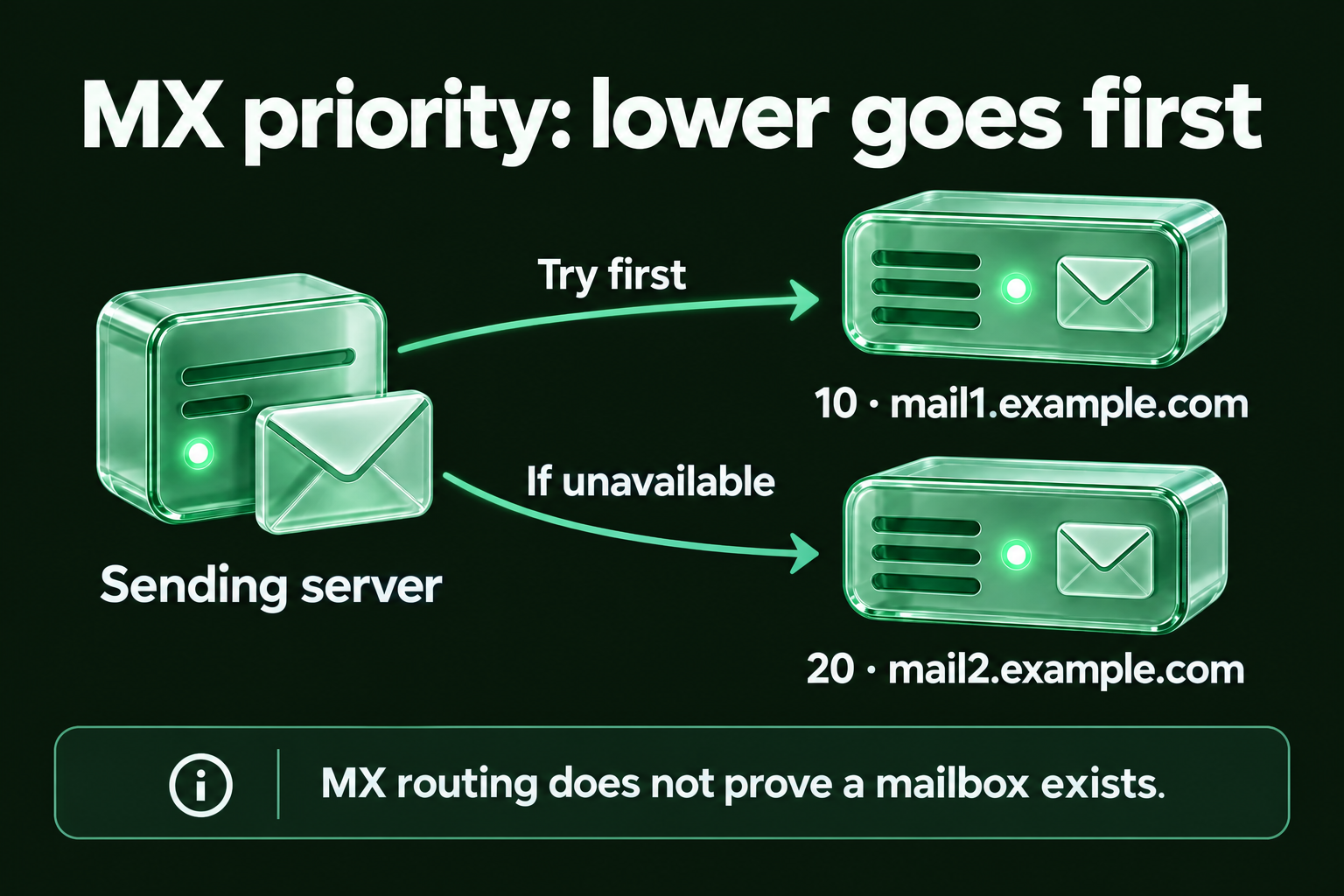
The first field after MX is the priority number. The second is the hostname of the mail server. Lower priority numbers are tried first. In this example, mail1 handles all incoming mail under normal conditions, and mail2 is the fallback if mail1 is unavailable.

The 3600 is the TTL (time to live): how many seconds DNS resolvers cache this record before refreshing it. It affects propagation speed when records change, but has no impact on how fast individual messages are delivered.

How MX Priority Works: Why the Numbers Matter

Google Workspace vs Microsoft 365 MX record configuration comparison

Priority is the mechanism that makes email delivery resilient. When a sending server performs an MX record lookup and gets back multiple records, it sorts them by priority number and tries the lowest-numbered host first. If that connection fails, it moves to the next. It keeps walking down the list until something accepts the connection or the list is exhausted.

Two real-world patterns worth knowing:

Google Workspace uses five MX records:

; Google Workspace MX configuration
yourdomain.com.  MX  1   ASPMX.L.GOOGLE.COM.
yourdomain.com.  MX  5   ALT1.ASPMX.L.GOOGLE.COM.
yourdomain.com.  MX  5   ALT2.ASPMX.L.GOOGLE.COM.
yourdomain.com.  MX  10  ALT3.ASPMX.L.GOOGLE.COM.
yourdomain.com.  MX  10  ALT4.ASPMX.L.GOOGLE.COM.

Priority 1 is the primary. The two priority-5 records share load equally. When two records have the same number, the sending server picks between them at random. The two priority-10 records are secondary fallbacks.

Microsoft 365 takes a different approach entirely:

; Microsoft 365 MX configuration - single record, internal failover
yourdomain.com.  MX  0   yourdomain-com.mail.protection.outlook.com.

One record, priority 0. Microsoft handles all redundancy internally behind that single endpoint. Teams migrating from Google Workspace to Microsoft 365 sometimes expect to see multiple records and assume something is misconfigured when they see only one. It isn't.

The critical insight on priority numbers: the absolute values don't matter, only the relative order. A setup with priorities 1 and 2 behaves identically to one with priorities 10 and 20. Using increments of 10 is convention, not a requirement. It just leaves room to insert servers between existing priorities without renumbering everything. As defined in RFC 5321, Section 5, the sending server sorts by preference value and attempts delivery in ascending order.

When two or more records share the same priority, the sending server distributes traffic between them at random. This is how MX records implement load balancing without a dedicated load balancer.

What Happens When There Are No MX Records

A domain can have a live website, a valid SSL certificate, and hundreds of addresses in your CRM, and still be unable to receive email. The website and the email infrastructure are independent. A domain with no MX records configured has no path for incoming mail.

Three common scenarios in B2B lists:

Abandoned domain after an email provider migration. A company switches from one ESP to another, points the new MX records correctly, but never removes the old ones, or worse, removes all records during the transition and forgets to re-add them. The domain resolves, but no mail gets through.

Holding company or brand domain. Many enterprise structures have multiple domains that exist for legal or branding purposes but were never set up to receive email. Addresses at those domains look legitimate in a list export but have never worked.

Freshly registered domain. New domains appear in B2B prospecting tools quickly. A company registers a domain, builds a website, but hasn't configured email infrastructure yet. Every address there is Undeliverable until MX records are set.

There is a historical fallback defined in RFC 974, the original mail routing specification, that says sending servers should attempt delivery to a domain's A record if no MX records exist. In 2026, almost no receiving infrastructure relies on this fallback. A verifier seeing zero MX records correctly returns Undeliverable for every address at that domain, without attempting an SMTP probe.

How to Run an MX Record Lookup

Three methods, in order of convenience:

1. Online lookup toolsThe fastest option for quick checks. MxToolbox, DNSChecker, and EasyDMARC all offer free MX lookup interfaces. Enter the domain name and the tool queries the authoritative name server and returns the full MX record set: hostnames, priority numbers, and in some cases SMTP connectivity diagnostics. Useful for troubleshooting a specific domain or verifying that a DNS change has propagated.

2. Command line: macOS and Linux

# bash
# Query MX records for a domain using dig (macOS / Linux)
dig mx example.com +short

The +short flag strips the header and returns just the priority and hostname for each record. Without it, you get the full DNS response including TTL and the querying resolver. For propagation checks, run without +short and compare results across different DNS servers by adding @8.8.8.8 (Google) or @1.1.1.1 (Cloudflare) to the command.

3. Command line: Windows

; Query MX records using nslookup on Windows
nslookup -type=mx example.com

Note that nslookup uses the term "preference" instead of "priority". They mean the same thing. The output lists each mail server hostname and its preference value. To query against a specific DNS server, add its IP at the end of the command: nslookup -type=mx example.com 8.8.8.8.

Use online tools for quick sanity checks and client-facing verification. Use CLI for validating DNS propagation, comparing results across multiple resolvers, and confirming that changes have fully propagated before sending a campaign.

How Email Verification Uses MX Record Lookup

email verification MX lookup outcomes — three paths from DNS query to verification result

MX record lookup is the DNS check that determines whether a domain has active mail infrastructure before any connection to a mail server is attempted. In the email verification pipeline, the MX record lookup runs at step three: after syntax parsing and typo detection, and before the email verification pipeline moves to the SMTP handshake that checks whether a specific mailbox exists.

How does email verification use MX record lookup? The verifier queries the MX records for every domain on the list. Domains with no MX records return Undeliverable immediately for all associated addresses, without attempting an SMTP connection. Domains with active MX records proceed to the SMTP layer for individual mailbox verification.

Here's what makes EmailAwesome's implementation different from a basic MX check.

A list of 50,000 contacts may contain only 3,000 to 5,000 unique domains. EmailAwesome runs MX lookups grouped by unique domain — not by individual address. That means 4,000 DNS queries instead of 50,000. The batch domain check filters all addresses on non-mail domains in seconds, before the verifier initiates a single SMTP connection. It's part of the architecture that allows EmailAwesome to process 20,000 contacts in under 10 minutes.

The three outcomes of an MX lookup in the verification pipeline:

MX records present and resolving to active servers. The domain has email infrastructure. The address proceeds to the SMTP handshake for mailbox-level verification.

MX records present but mail server not responding. The DNS record exists but the server it points to is offline, unreachable, or misconfigured. The address is classified as Risky or Unknown, not hard Undeliverable, because the infrastructure may recover.

No MX records. The domain cannot receive email through standard delivery. Every address at that domain is classified as Undeliverable immediately. No SMTP probe is attempted.

MX record failures are a significant driver of hard bounces in B2B lists. When a company migrates email providers, decommissions a domain, or lets DNS configuration lapse, the MX records stop resolving before the email addresses are officially abandoned. The verifier catches this at the DNS layer, protecting the sender from an SMTP connection attempt and the hard bounce that follows.

EmailAwesome processes over 10 million email addresses daily and maintains verified lists below a 1% bounce rate. The domain-grouped MX lookup is one of the architectural reasons that scale is achievable without sacrificing speed.

Once the MX lookup confirms active mail servers, the verifier moves to the zero-payload SMTP handshake, which checks whether the specific mailbox exists without sending a real message.

Start with 1,000 free verifications. No credit card required. Check your list free →

Common MX Record Issues That Cause Delivery Failures

# Issue Cause Verifier Result Sender Impact
1 No MX records Domain never configured for email, or records removed during migration Undeliverable Every address at that domain fails. Most common failure in B2B lists from Apollo or ZoomInfo exports.
2 MX points to CNAME DNS misconfiguration — RFC 5321 requires MX to point to an A or AAAA record, not a CNAME alias Risky Unpredictable routing behavior. Some servers accept; others reject the connection silently.
3 MX hostname resolves but server unreachable Mail infrastructure moved to a new server without updating DNS, or server temporarily offline Unknown Inconsistent results until the server comes back online or DNS is corrected.
4 Outdated records after ESP migration Old MX records not removed after switching providers (e.g., Google Workspace → Microsoft 365) Unknown Inconsistent verification during the DNS propagation window. Some resolvers return old records.
5 TTL set too high during migration Cached records don't refresh for up to 24h after changes if TTL wasn't reduced beforehand Risky Addresses appear deliverable to some resolvers and Undeliverable to others. Reduce TTL to 300–600s at least 48h before any planned migration.

Five problems the MX lookup catches before they become bounces:

1. No MX records

The domain exists and resolves, but has never had email infrastructure configured, or had it removed during a migration. Every address at that domain is Undeliverable. This is the most common MX failure in B2B lists sourced from tools that scrape domain registrar data.

2. MX record pointing to a CNAME instead of an A or AAAA record

The DNS protocol requires MX records to point directly to a hostname with an A or AAAA record, not to a CNAME alias. Pointing to a CNAME violates RFC 5321 and causes unpredictable routing behavior. Some receiving infrastructure handles it gracefully; others reject the connection. A verifier flags this configuration as Risky.

3. MX hostname resolves but mail server is unreachable

The MX record exists and the hostname resolves to an IP address, but nothing is listening on port 25 at that IP. The company may have moved their mail infrastructure to a new server without updating DNS, or the server may be temporarily down. Addresses at this domain return Unknown until the server comes back online or the records are updated.

4. Outdated MX records after an ESP migration

A company migrates from Google Workspace to Microsoft 365. The new MX records are set correctly, but the old Google records haven't been removed yet, or DNS propagation is still in progress. During the transition window, some DNS resolvers return the old records and some return the new ones. Verification results are inconsistent for addresses at that domain until propagation completes.

5. TTL set too high during a migration

A domain's MX records have a TTL of 86,400 seconds (24 hours). When the records are changed, resolvers that cached the old values won't refresh for up to 24 hours. Addresses at that domain may appear deliverable to some resolvers and Undeliverable to others during that window. Best practice before a planned migration is to reduce TTL to 300–600 seconds at least 48 hours in advance.

Pro Tip: "When clients report sudden delivery failures on domains that were working yesterday, MX records are always the first thing we check. About 30% of the time it's a DNS issue — expired domain, wrong MX after migration, or a typo in the hostname." — Mailflow Authority

Every address on a list that maps to a domain with hard bounce rate issues traces back to one of these five failure modes. The MX lookup catches all of them at the DNS layer, before any SMTP connection is opened.

The DNS Check Your List Can't Skip

The MX record lookup is the cheapest DNS lookup in the verification pipeline — and one of the highest-ROI steps for email deliverability. It runs in milliseconds per domain, requires no SMTP connection, and filters entire categories of invalid addresses before the heavier checks begin.

In B2B lists, it's also the most dynamic check. A domain that passed MX verification 90 days ago may have no valid MX records today. The company may have migrated providers, restructured their DNS, or let their email infrastructure lapse. B2B contact data decays at 20 to 30% annually. MX configuration changes are part of that decay.

EmailAwesome processes lists of up to 20,000 contacts in under 10 minutes. Domain-grouped MX lookup is part of why.

Check your list free →

Frequently Asked Questions

Check the most Frequently Asked Questions

What is an MX record lookup?

How do I check MX records for a domain?

What does it mean if a domain has no MX records?

How does MX record lookup fit into email verification?

What is MX record priority and how does it affect email delivery?

Latest
Posts

Actionable tips, current trends, and step-by-step guides to help your campaigns move from "delivered" to "adored."

View all posts